

There is a particular kind of Salesforce org that most of us have encountered.
Everything works. The automations run, the integrations connect, the reports return data, and users can create and update records. Technically speaking, the system is doing exactly what it was built to do.
But nothing explains itself.
There is a field called Status__c and another called Status_2__c. A picklist contains values that nobody remembers adding. A Flow contains elements named Get_Records_17, Decision_4, and Update_Records_9. Field descriptions are blank. Flow descriptions are blank. Somewhere, someone knows why all of this exists.
Or at least we hope they do.
For a long time, Salesforce teams have been able to survive this way because organizations develop tribal knowledge. An admin knows which status field is the real one. A developer knows why that strange automation exists. A business analyst remembers that one of those picklist values hasn’t actually been used since 2022.
Then we started giving AI access to our systems and asking it to understand our businesses.
Suddenly, all of that missing context became a much bigger problem.
When we talk about metadata in Salesforce, we typically think about the technical components that define our environment: objects, fields, Flows, layouts, permission sets, and everything else that makes up the configuration of an org. But there is another layer of metadata that is just as important. It’s the information that explains what those components mean, why they exist, how they relate to one another, and how they should be used.
That descriptive layer has always been valuable architecture. With Agentforce, some of it can also become context that helps a reasoning engine understand the capabilities we’ve made available.
And that changes how we should think about documentation.
Start With the Data
Let’s start with something familiar: objects and fields.
An object represents something in the business. A Case, Asset, Contact, Order, Complaint, or custom object reflects a business concept, while relationships help explain how those concepts connect. A Complaint related to an Asset, Product, Contact, and Account provides considerably more business context than the Complaint record alone.
This is one reason data modeling matters so much. As we discussed in Modeling the Business, Not the Software, our data models are effectively representations of how we understand our businesses.
But even a well-designed data model can be difficult to understand when we haven’t explained what its components mean.
Consider a field called Reason__c. What does that tell us? Not much. Even the label “Reason” leaves plenty of questions. Reason for what? Who selects it? At what point in the process? Is it the customer’s stated reason, an internal classification, or the final determination after an investigation?
Now imagine that field has the following description:
The final reason assigned by the Quality team after investigation. Do not use this field for the customer’s initially reported issue.
The field hasn’t changed. The data hasn’t changed. But our ability to understand what that information means has changed considerably.
This is also why a description like “The reason for the complaint” isn’t especially helpful. It technically fills in the Description field, but it doesn’t provide meaningful context. Good descriptions explain business meaning, intended usage, important distinctions, and sometimes even what something should not be used for.
The same principle applies to picklists. Imagine a Case Reason picklist containing Broken, Doesn’t Work, Product Failure, Defective, Malfunction, Other, and Other – Product. Are these distinct business classifications, or have we accumulated seven ways to describe essentially the same thing?
Picklists, global value sets, dependent picklists, statuses, and categories collectively form part of the vocabulary of our business. When that vocabulary is ambiguous, inconsistent, or outdated, the information built upon it becomes harder to interpret.
And descriptions aren’t the only metadata worth maintaining.
Salesforce also provides four field-level data classification attributes that are surprisingly easy to overlook: Data Owner, Field Usage, Data Sensitivity Level, and Compliance Categorization.
Data Owner helps identify the person or group responsible for understanding and governing a field’s information. Field Usage tells us whether a field is active, hidden, or a candidate for deprecation. Neither replaces the actual work of establishing ownership or managing a field’s lifecycle, but both give us a place to document those decisions.
Then we have Data Sensitivity Level, which can classify information using values such as Public, Internal, Confidential, Restricted, or Mission Critical, and Compliance Categorization, which identifies relevant classifications such as PII, GDPR, HIPAA, or PCI.
These attributes aren’t just additional boxes on a field definition. They describe how the organization understands and intends to govern its information.
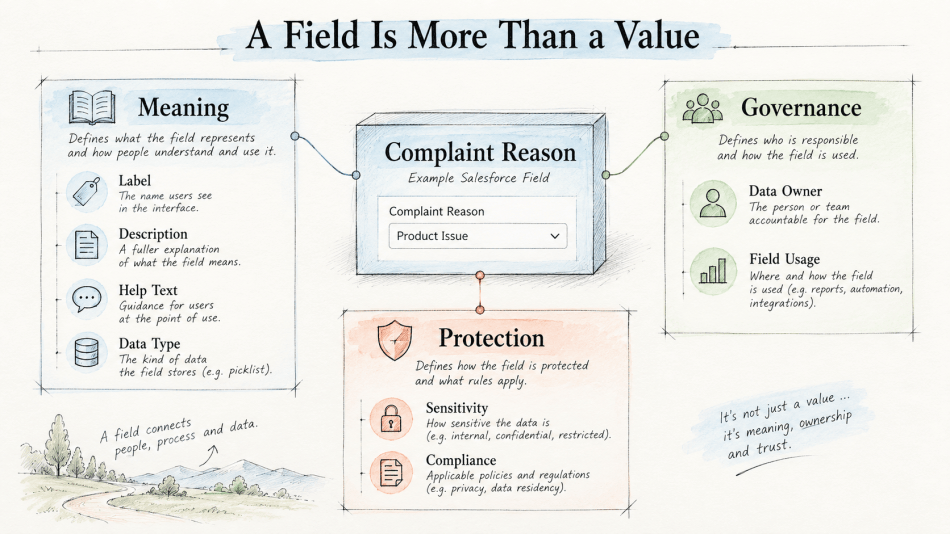
Consider an org with Customer_Type__c, Customer_Type_New__c, and Customer_Segment__c. An experienced admin might know which field represents the current business definition, but that understanding should not exist exclusively in someone’s head. Descriptions, field usage classifications, and clearly documented ownership can help establish which field is authoritative and which ones are legacy.
Of course, that only works if the metadata is accurate. A six-year-old description explaining a process that no longer exists may be more misleading than a blank one.
Metadata needs maintenance just as much as the data it describes.
Classification Is Not Enforcement
There is an important distinction here, especially when we start talking about agents.
Assigning a Data Sensitivity Level of Restricted does not automatically prevent a user from accessing a field. Likewise, marking a field as containing personally identifiable information does not, by itself, prevent an Agentforce agent from retrieving or using that information.
Classification is not the same as enforcement.
Data classification helps us identify what the information is and how it should be treated. Salesforce security controls determine who can access it. Our agent architecture determines what information is made available through grounding, retrieval, actions, and other runtime mechanisms.
These decisions are connected, but they are not interchangeable.
Salesforce can use sensitivity and compliance classifications in certain privacy and anonymization capabilities. That demonstrates how classification metadata can support actual governance functionality when a feature is designed to consume it. But we should not assume that every Salesforce product, Flow, or Agentforce action automatically interprets those classifications and enforces the policies we intended.
For an agent, this creates some important design questions.
If a field is classified as Restricted, does the agent need it to accomplish the task? If an action retrieves sensitive information, should that information be included in its output? Could the action return a less sensitive result instead? If the agent is acting on behalf of a user, have we designed its permissions and available actions appropriately?
These are architecture decisions.
We discussed in Security Is an Architecture Decision how security needs to be designed into the foundation of a system rather than applied as an afterthought. Data classification is another part of that foundation. It helps us identify risk and make informed decisions, but those decisions still need to be implemented through appropriate controls.
Describe the Capability, Not Just the Automation
Metadata extends well beyond objects and fields, and I think this is where things get particularly interesting for Agentforce.
Consider an autolaunched Flow that issues a service recovery credit to a customer. Internally, it might retrieve customer information, evaluate eligibility, determine a credit amount, and create a credit record.
A Flow containing Get_Records_17, Decision_4, and Create_Records_3 might work perfectly, but it doesn’t tell the next person maintaining it very much.
Compare that with elements named Get Customer’s Active Membership, Determine Maximum Credit, and Create Service Recovery Credit. Add descriptions explaining the business rules being evaluated, the information being retrieved, and why each step exists.
We’ve made the automation considerably easier to understand without changing how it executes.
Now imagine exposing that Flow as an Agentforce action.
This is where the distinction between documenting automation and describing a capability becomes important. Internal Flow element descriptions are valuable for the people maintaining the automation, but we shouldn’t assume the agent automatically reads every element description inside the Flow.
Instead, we need to pay particular attention to the metadata associated with the action we’re exposing.
An action called Issue Service Recovery Credit is much more meaningful than one called Run Credit Flow. Its description should explain that the action issues an approved service recovery credit to an existing customer following a qualifying service issue, including the circumstances under which it should be used.
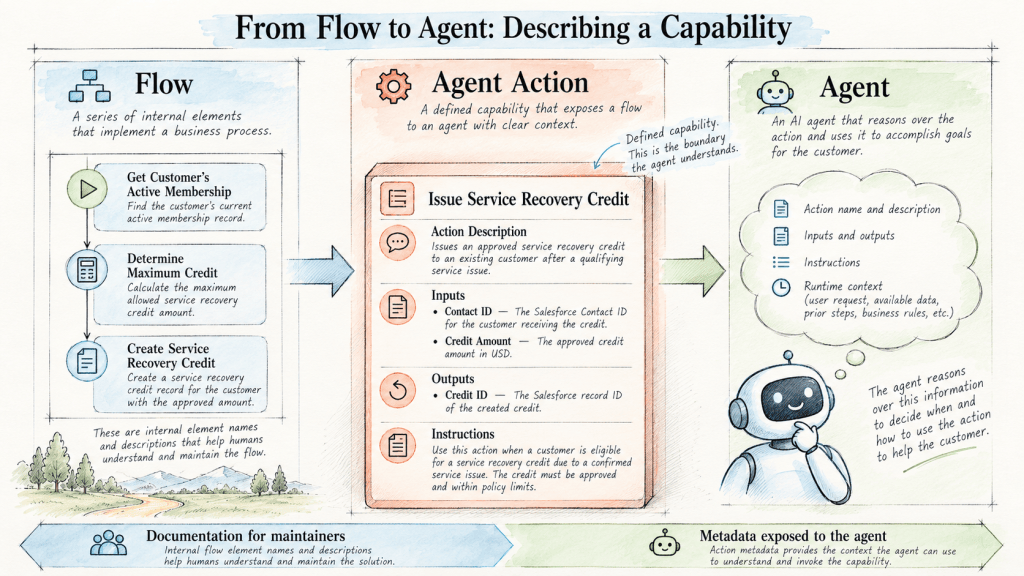
The inputs need the same attention. A variable named recordId doesn’t tell us much. Describing it as “The Salesforce Contact ID of the customer receiving the credit” provides useful context. An input called amount becomes more meaningful when we explain that it represents the approved credit amount in USD. The output should also explain what the action returns, such as the Salesforce record ID of the newly created credit.
Salesforce can populate an agent action’s descriptions from its underlying reference action, and those descriptions can be reviewed and refined when the action is configured. The agent uses the descriptions and instructions available to it to help understand what an action does and when to invoke it.
This means some of the descriptive metadata we’ve traditionally thought of as documentation can now participate much more directly in how an intelligent system operates.
But I think there’s a temptation we need to be careful about.
When an agent doesn’t understand something, our instinct may be to add another instruction. We explain that “broken,” “defective,” “malfunctioning,” and “product failure” might all mean the same thing. We tell it which of three status fields to use. We add exceptions for the unusual cases that nobody ever cleaned up.
Eventually, our agent instructions become a translation layer for all the ambiguity we’ve accumulated underneath them.
Sometimes additional instructions are necessary. But sometimes the better question isn’t “How do I explain this to the agent?”
It’s “Why is our architecture so difficult to explain in the first place?”
Context Goes Beyond Your Configuration
The same principles apply when we move beyond structured Salesforce data.
Think about Knowledge. The content of an article is important, but so is the information that helps us determine when the article is relevant. Its title, product applicability, version, language, audience, publication status, data categories, and other classifications can all contribute to how we organize and retrieve information.
This takes me back to the library analogy we explored in an earlier post about retrieval-augmented generation.
A library isn’t useful simply because it contains books. It’s useful because those books can be organized, indexed, discovered, and retrieved. The catalog provides context that helps us find the right information.
Knowledge works much the same way.
If we’re building an agent that needs to answer product troubleshooting questions, the distinction between an article for Product A and an article for Product B matters. So does the product version, regional applicability, and whether the information is intended for customers or internal support teams.
However, simply populating those attributes does not guarantee that Agentforce will automatically use them when retrieving information. The retrieval configuration, indexing, filters, available data sources, and grounding strategy determine how that metadata participates in finding relevant content.
And this brings us to what may be the most important distinction in the entire conversation.
Not all metadata automatically becomes agent context.
A field can have a beautifully written description, but that doesn’t mean the reasoning engine receives it during every interaction. A Flow can be perfectly documented without exposing its internal details to the agent. A Knowledge article can be thoroughly classified without every classification being used by the retrieval mechanism.
What an agent understands depends on what we make available to it, how we describe that information, and how we configure the capabilities it can use.
This is why context is an architecture decision rather than simply a documentation exercise.
Good metadata makes our environment understandable. Good architecture determines how that understanding is made available to the systems that need it.
We also need to remember that context has to remain accurate. If an action changes but its description doesn’t, we’re providing misleading guidance. If a Knowledge article applies to an older product version but isn’t classified accordingly, we risk retrieving information that no longer applies. If multiple fields claim to represent the same business concept, we need to establish which source is authoritative.
More context isn’t necessarily better context.
The goal is relevant, accurate, appropriately governed context.
Context Is Architecture
So where should we start?
I don’t think we need to launch a massive metadata cleanup project or spend six months rewriting every field description in our Salesforce org.
Instead, pick one important business process and follow it through the system.
Look at the objects and relationships involved. Review the fields, their descriptions, and their classifications. Consider whether the picklists represent meaningful business vocabulary. Follow the Flows that support the process, and examine how their purpose, inputs, outputs, and business rules are documented.
If Knowledge supports the process, review how the content is organized and classified. If you’re exposing any of these capabilities to Agentforce, pay attention to the metadata the agent actually receives.
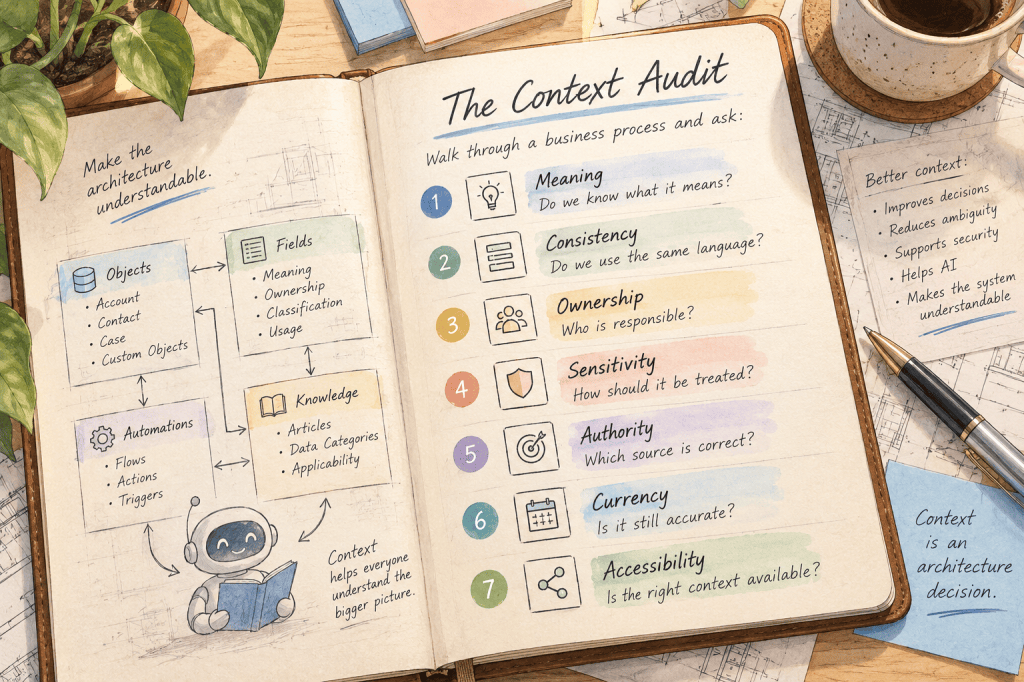
As you go, ask whether someone unfamiliar with the org could understand what they’re looking at. Is the terminology consistent? Do we know who owns the information? Have we identified sensitive data? Is it clear which sources are authoritative? Is the metadata still accurate? And are we exposing the right context to the systems that need it?
You’ll probably find some things worth improving.
That’s okay.
You don’t need perfect metadata to build an agent. But understanding where the ambiguity exists allows you to make intentional architectural decisions instead of asking AI to compensate for it.
And none of this is only about AI.
Clear descriptions help admins maintain unfamiliar configuration. Good naming helps developers troubleshoot automation. Consistent vocabulary improves reporting and analytics. Data classification supports security and governance. Well-organized Knowledge helps service teams find the right answers. Documented ownership makes it easier to manage change.
We’ve always benefited from making our systems understandable.
AI has simply introduced another consumer of that understanding, one that wasn’t in the meeting three years ago when somebody explained why Status_2__c is actually the field everybody should use.
For years, we’ve been able to let some of our architecture live in people’s heads. Someone knew why that field existed. Someone remembered what that picklist value meant. Someone understood which Knowledge article applied to which product. Someone knew which Flow was safe to call.
That approach becomes increasingly fragile as our systems become more intelligent and autonomous.
An agent doesn’t have access to organizational folklore.
It has the context we architect for it.
So maybe one of the most important things we can do to prepare for AI isn’t particularly flashy. Name things well. Describe what they mean. Classify the data. Define the vocabulary. Document the capability. Make the system understandable.
Because before we ask our systems to be intelligent, we should make sure we’ve given them something worth understanding.


0 comments on “Context Is an Architecture Decision”