

Fresh chickens, fresh dirt, fresh org
Before a single egg is laid or sensor is installed, the very first step in this backyard-meets-tech journey is—naturally—setting up a fresh Salesforce Developer Edition environment. 🧼🐣
Why start with a clean org? Because I want zero interference from other projects and full freedom to build whatever wild (or feathered) idea comes next. I also want a place where I can safely explore new features—like Data Cloud and maybe even Agentforce—without messing up anything tied to work or existing demos.
☁️ What I Set Up
Here’s how I’m getting things rolling:
- ✅ Signed up for a new Developer Edition org
- ✅ Named it “Backyard Operations” because… obviously
- ✅ Installed a few handy tools: Salesforce Inspector and ORGanizer tab
- ✅ Created a custom Lightning App
Next up: building out the data model for all things chickens, garden beds, and sensor data.
🧬 Backyard Operations Data Model
Because of course I needed custom objects for my chickens
Thinking about everything I’m adding to my backyard—and everything I want to tinker with—it’s a lot. I’ve got garden beds with different plants, soil types, and a watering system. I’ve got potted herbs on the porch. I’ve got a chicken coop that will soon house five little chicks who need food, water, and the right environmental conditions. Oh, and they’ll (hopefully) start laying eggs.
**Architect Triggered**
🐔 Let’s start with the chickens
I’ll need a Chicken object to track things like:
- Breed
- Age
- Hatch date
- Coop assignment
- And of course… notes. (Because “Olivia is bossy” needs to be documented.)
Then there’s the Coop itself, which deserves its own object. It’ll hold things like:
- Location
- Current temperature (pulled from a sensor)
- Maybe even a cleaning schedule checkbox? Because… me.
And what are chickens without eggs? 🥚
The Egg Log object will track:
- When the egg was laid
- Which chicken laid it (if I can figure that out)
- Egg color
- Weight
- Condition (Normal? Cracked? Surprise double yolk?)
Okay, yes, I may be overthinking it—classic architect behavior. This might end up like those forms where Sales asks for 20 fields and only fills in 5. But hey, better to design for curiosity now and simplify later.
🌱 Onto the garden beds
For the garden, I’ll need a Garden Bed object to track:
- Bed size
- Soil type
- Current moisture level
- What’s planted in each square (shoutout to Square Foot Gardening!)
Then we’ve got the Planted Crop object—because of course I want to track yield over time, seasonal patterns, and which crops actually do well in this climate.
🔧 Don’t forget the sensors
Both the coop and garden beds will have sensors. To start:
- Soil moisture sensors for the garden
- Temperature (and maybe humidity) for the coop
Eventually? Maybe:
- Feeder weight sensors (to estimate food consumption)
- Water sensors
- Nest box pressure sensors
- Motion detectors for perches or toys
- Chicken Fitbit??
To avoid creating a unique object for each sensor type, I’m designing a general Sensor object with record types to define attributes based on the sensor’s purpose. Then, a Sensor Reading object will store the actual measurements over time.
Yes, it’s getting complex—but also kind of awesome. Which brings us to…
🔍 Visualizing the Data Model
Let’s see how all this connects visually:
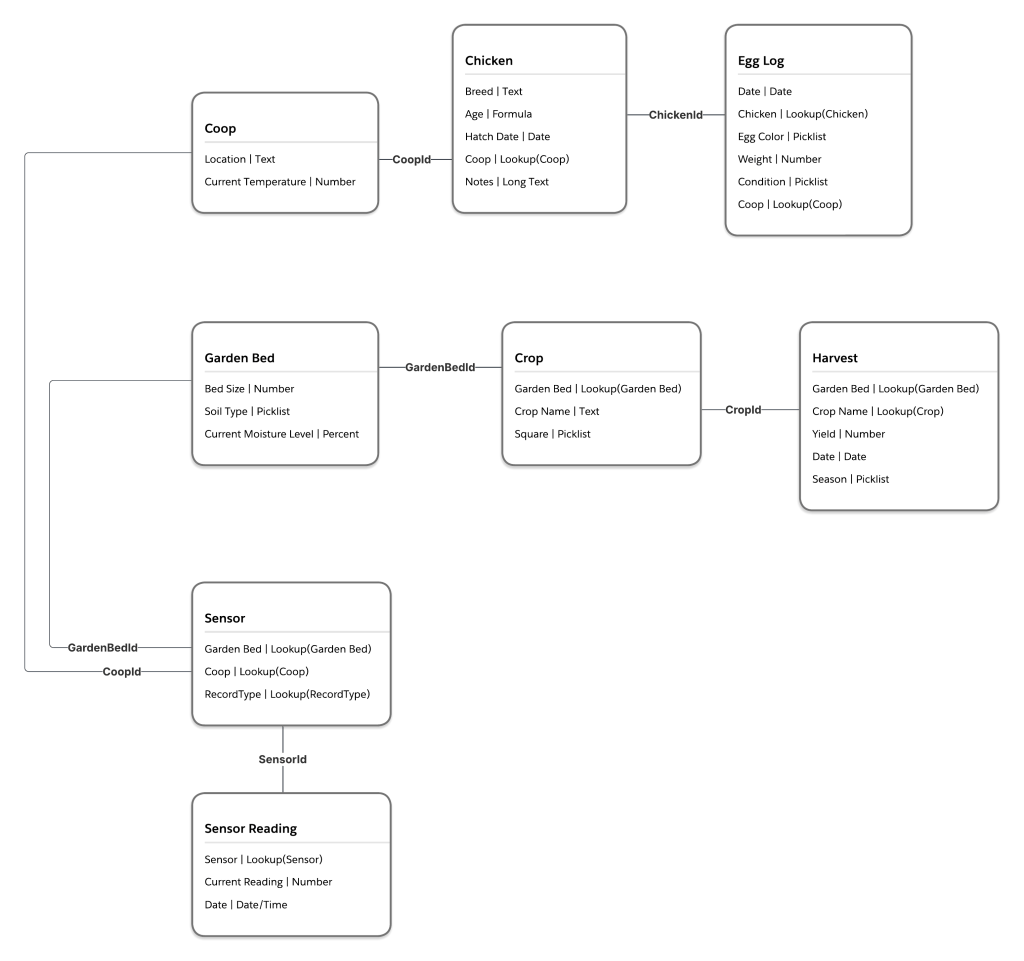
Egg Logs tie back to Chickens, which live in a Coop. Sensor Readings can be associated with either Coops or Garden Beds, and Maintenance Tasks (Tasks) can apply to anything. It’s flexible, clean, and sets me up to bring in automation, analytics, and IoT magic down the road.
What else do you think I should be tracking?
🐣 Why It Matters
This project isn’t just a cute side hustle with fluffy animals (though let’s be real—that’s a bonus). It’s a sandbox where I can test out architectural ideas, new Salesforce features, and even some integrations I’ve been curious about—without the pressure of perfection.
It’s also the perfect way to explore how technical storytelling, solution design, and real-world creativity can intersect. And yes, it’s helping me become a better architect while spending more time with my kids and my backyard. Win-win.
💡 What’s Next?
Now that the structure is in place, I can start bringing this org to life with automations, dashboards, and live data. And while I don’t technically need all these fields to raise chickens… I do need them for science, learning, and a little fun.
My #BackyardOperations journey is just getting started!
 Force For Fun
0 comments on “🧰 Backyard Operations, Part 2: Setting Up the Org + Building the Data Model”